Is there an integration for Gravity Forms with 2Checkout? Yep – there sure is! Use this integration today and enable your WordPress forms to process secure global payments with 2Checkout and Gravity Forms.

Why is processing global payments via your WordPress website important?
According to a Stripe study as quoted in an article by Grain Finance, “Ignoring local currency is costing you revenue“:
- 90% of online shoppers prefer local currency transactions
- 17.5% uplift in cross-border revenue for eCommerce vendors offering local currency
- 8.5% higher checkout conversion rates when local currency transactions are offered
So if you run a WordPress website and offer products or services for online purchase to a global audience, then you are undoubtedly ‘leaving money on the table’ by ignoring local currency transactions.
Why integrate Gravity Forms and 2Checkout?
2Checkout is a truly global payment processor and commerce solution. Within a single platform, 2Checkout unifies:
- Payments
- Billing
- Tax compliance
- Partner sales
…all under one roof.
It’s the payments service provider that feels local to the online shopper and provides full Merchant of Record, keeping you compliant with all regulatory standards, such as tax.
Gravity Forms is more than just a WordPress forms builder. It’s also an eCommerce engine. You can use Gravity Forms to sell almost any product or service online. And with the help of the 2Checkout add-on, it is now possible to integrate 2Checkout and Gravity Forms to deliver a truly seamless eCommerce experience in over 100+ local currencies worldwide.
How to integrate Gravity Forms with 2Checkout
[Image Source: Gravity Forms Developer Guide]
Step 1. Get your licenses
Gravity Forms and 2Checkout licenses grant you the permission to access the integration.

Gravity Forms License
The integration is available with the Gravity Forms Elite tier license.

2Checkout License
This integration is available with any of the 4 pricing plans: 2Sell, 2Subscribe, 2Monetize & 4Enterprise.
Step 2. Get the add-on
Download the Gravity Forms 2Checkout add-on. This integration allows you to connect 2Checkout global payments with Gravity Forms within your WordPress website:

Step 3. Create a Gravity Form
If you haven’t created your Gravity Form yet, the guide below help you get started to set up a form for selling your first online product or service:

Step 4. Set up your 2Checkout API credentials
If you haven’t already registered your API access via 2Checkout, this resource will take you through the steps:
Step 5. Set up your 2Checkout IPN to use 2Checkout for transactions
You’ll need to set up instant payment notifications (IPNs) using webhooks to configure your 2Checkout account to communicate properly with your Gravity Forms:
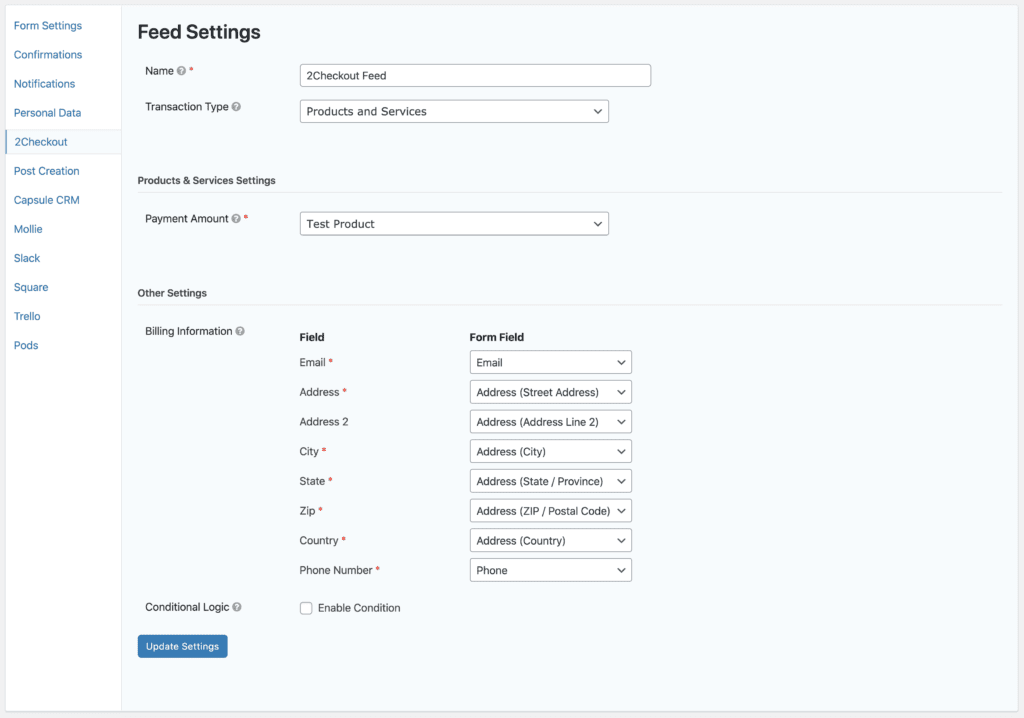
Step 6. Create your integration feed
Using your product field, total field and 2Checkout field in the relevant Gravity Forms, you’ll need to set up and configure a feed to allow form submission data to pass into 2Checkout:
Read the docs version
Watch the video version
Bonus steps:
Integrate your 2Checkout/Gravity Forms feed with Gravity Flow for payment and billing business process automation
With Gravity Flow, you can build productivity-enhancing automated workflows involving Gravity Forms and 2Checkout transactions for better and faster online payment processing:
Get smarter with 2Checkout/Gravity Forms add-on filters
Control how the properties within the feed data from Gravity Forms get processed by 2Checkout.
Filters
Modify the Gravity Forms feed meta before they are passed to 2Checkout
Community Tips and Troubleshooting
Here is a real case study for which the Gravity Forms to 2Checkout integration add-on would be a perfect fit:
Integration with a local bank in Pakistan?
With this integration, it is indeed possible to process online payments in Pakistani Rupee.

Need help with your Gravity Forms 2Checkout integration?
We offer a Gravity Forms done-for-you and consulting service.
Also, we recommend using any of these top Gravity Forms developers in our recommended list.
 Editorial Staff.